For anyone with more than one team

Two games. One car. No teleporter.

Can one driver make both games? Your calendar checks whether two games overlap. TwoGames+ checks whether one driver can make both: the drive between fields, rinks and courts, how early each game needs you there, and when to leave home.

Get it on Google Play

Also on Android. On an iPhone or a computer, use it in your web browser.

Free to start. Every plan checks every day.

Whose Thursday?

  1. 4:37 PMLeave home18 min to Eastside Park
  2. 5:20 PMMaya · Soccer gameEastside Park · be there 4:55, 25 min early
  3. 7:17 PMOff the field, drive 15 minEastside Park to Veterans Field
  4. 8:00 PMLeo · Baseball practiceVeterans Field · be there 7:45, 15 min early
8:00 PM
Who takes Leo?
Tight13 minutes to spare after the drive.

The real check, simplified: 25 minutes early for a soccer game, 15 to pack up, 15 early for a baseball practice, and the drive between.

The difference

Your calendar is an optimist. We're the friend with the map.

What a calendar sees
Maya · Soccer game5:20–7:02 PM
Leo · Baseball practice7:45–8:45 PM

No overlap. Looks fine.

What TwoGames+ sees
Gear packed and out the gate7:17 PM
Drive to Veterans Field15 min
Leo's practice wants you by7:30 PM

ConflictShort by 2 minutes. No overtime, no shootout.

How it works

Four steps, and every base is covered.

  1. Snap the schedule

    Take a screenshot or a photo of the league's schedule, use the PDF they sent, or paste your team's calendar link. An AI model reads a picture or a PDF, and you check every row before anything is saved.

    Yes, a photo of the printout taped to the rink door works too.

  2. Say how early

    A baseball game wants you there 25 minutes early; flag football, 25. Every sport starts with sensible numbers, and you can change them for a league or a single event.

    And hockey, 25: skates don't lace themselves.

  3. See every day

    Each day reads Fits, Tight or Conflict, with the time to leave home and the drive between venues.

  4. Fix the day

    Skip something, or hand it to another driver. A day only counts as resolved when the check agrees.

    Sub in Grandpa. He's been waiting at the scorer's table since August.

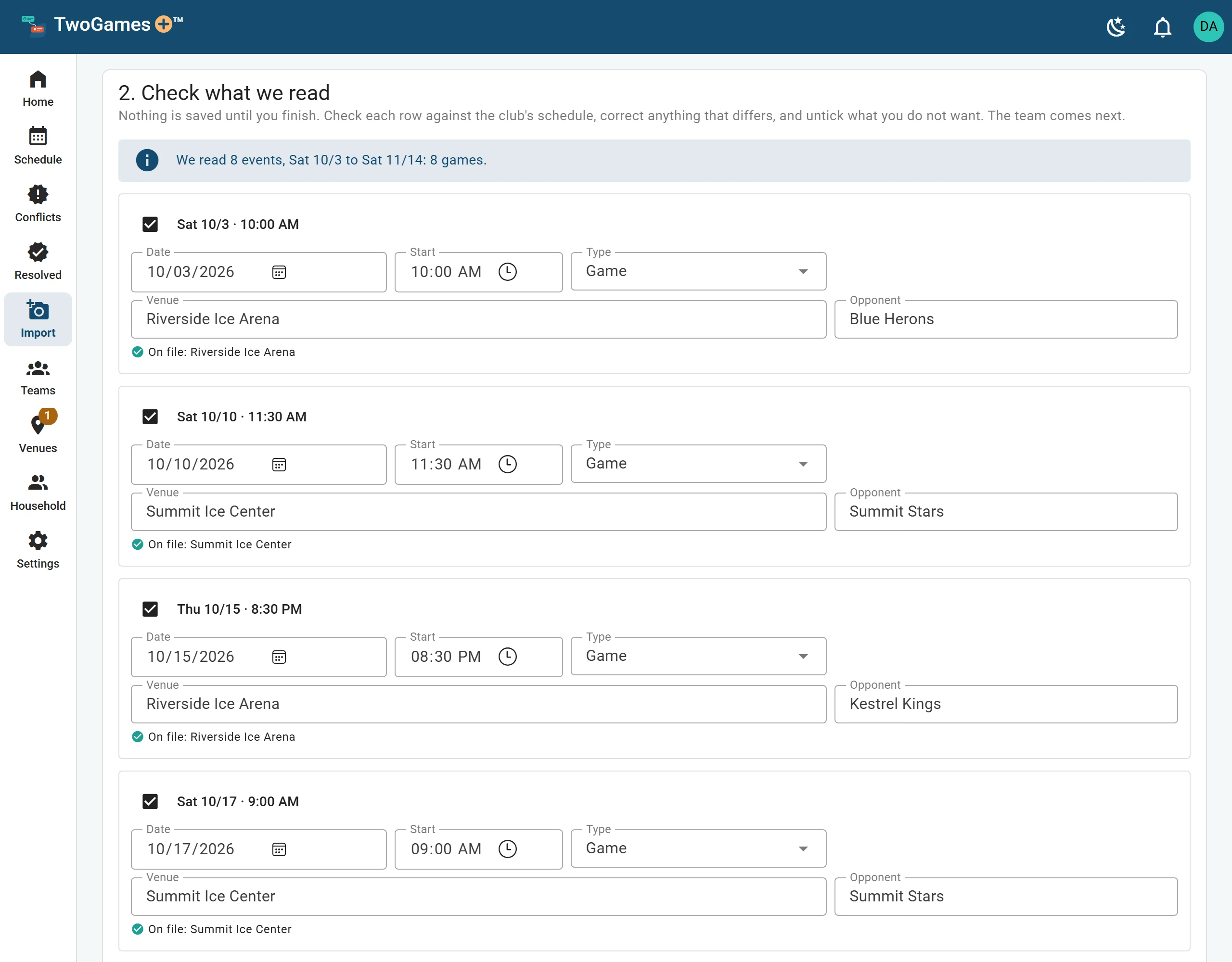
Import, step 2, Check what we read: 8 games read from October 3 to November 14, each row with its date, start, type, venue and opponent, and each venue matched to one on file, Riverside Ice Arena or Summit Ice Center.
1 Snap the schedule. Check every row before anything is saved.
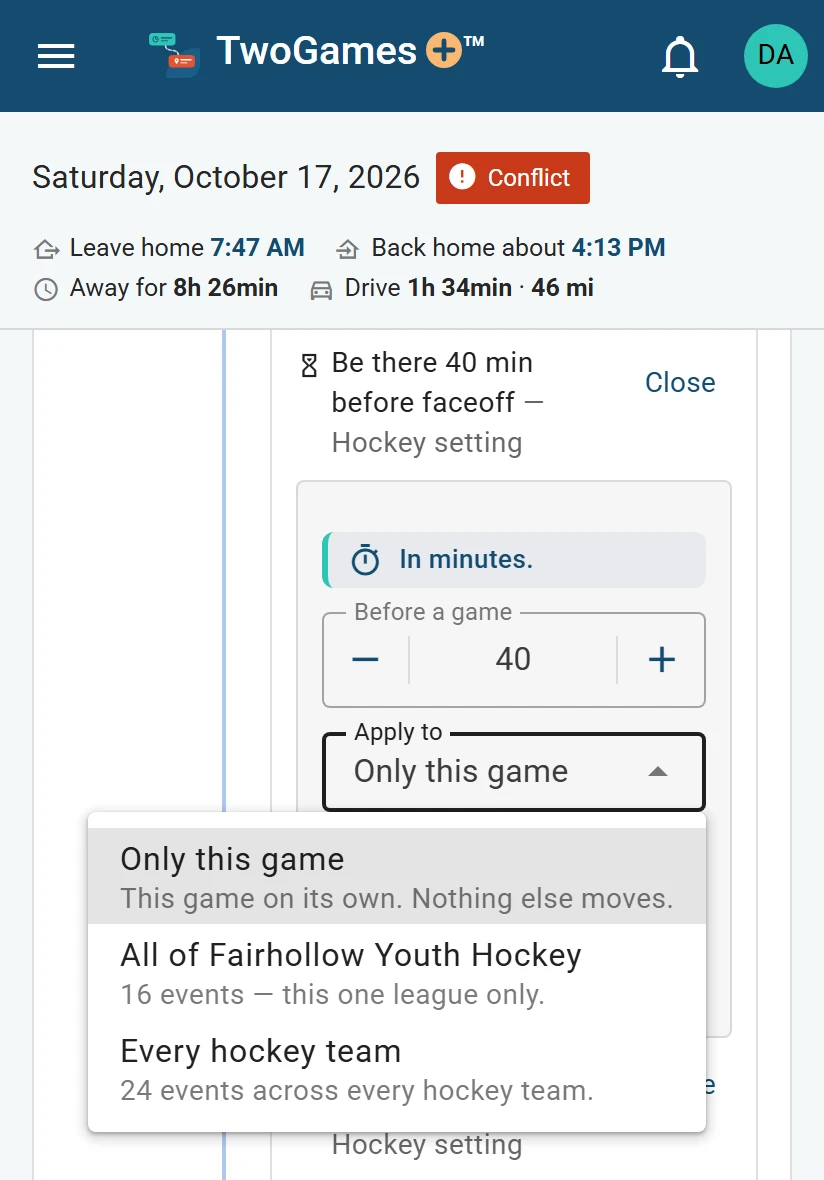
Ava’s hockey game on a phone, changing Be there 40 min before faceoff, with Apply to open: Only this game, All of Fairhollow Youth Hockey, or Every hockey team.
2 Say how early. Choose how far a change goes.
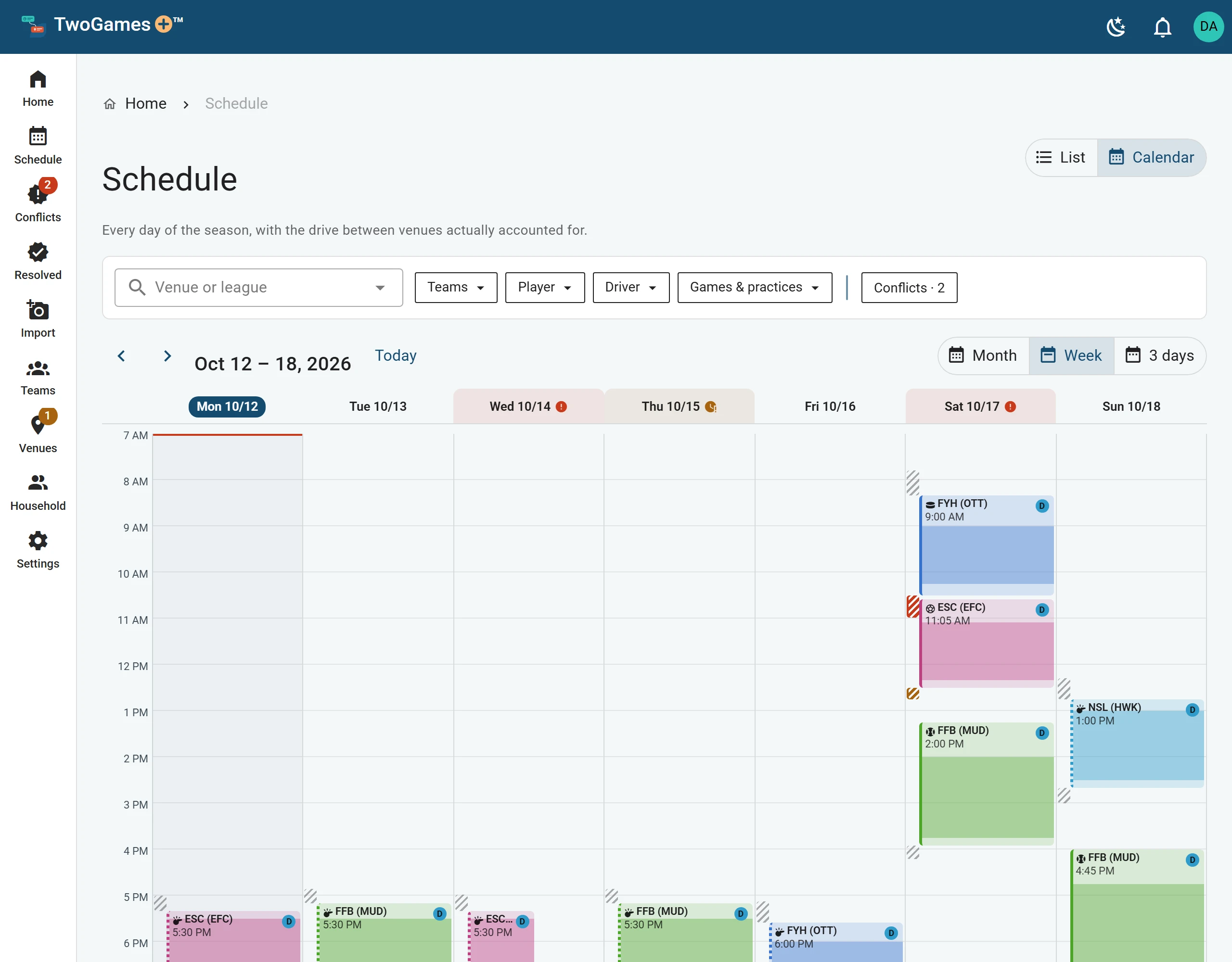
The Schedule’s week of October 12 to 18: Wednesday and Saturday marked Conflict, Thursday Tight, and the other days fitting, each event a block with its drive before it.
3 See every day. Every day gets a verdict.
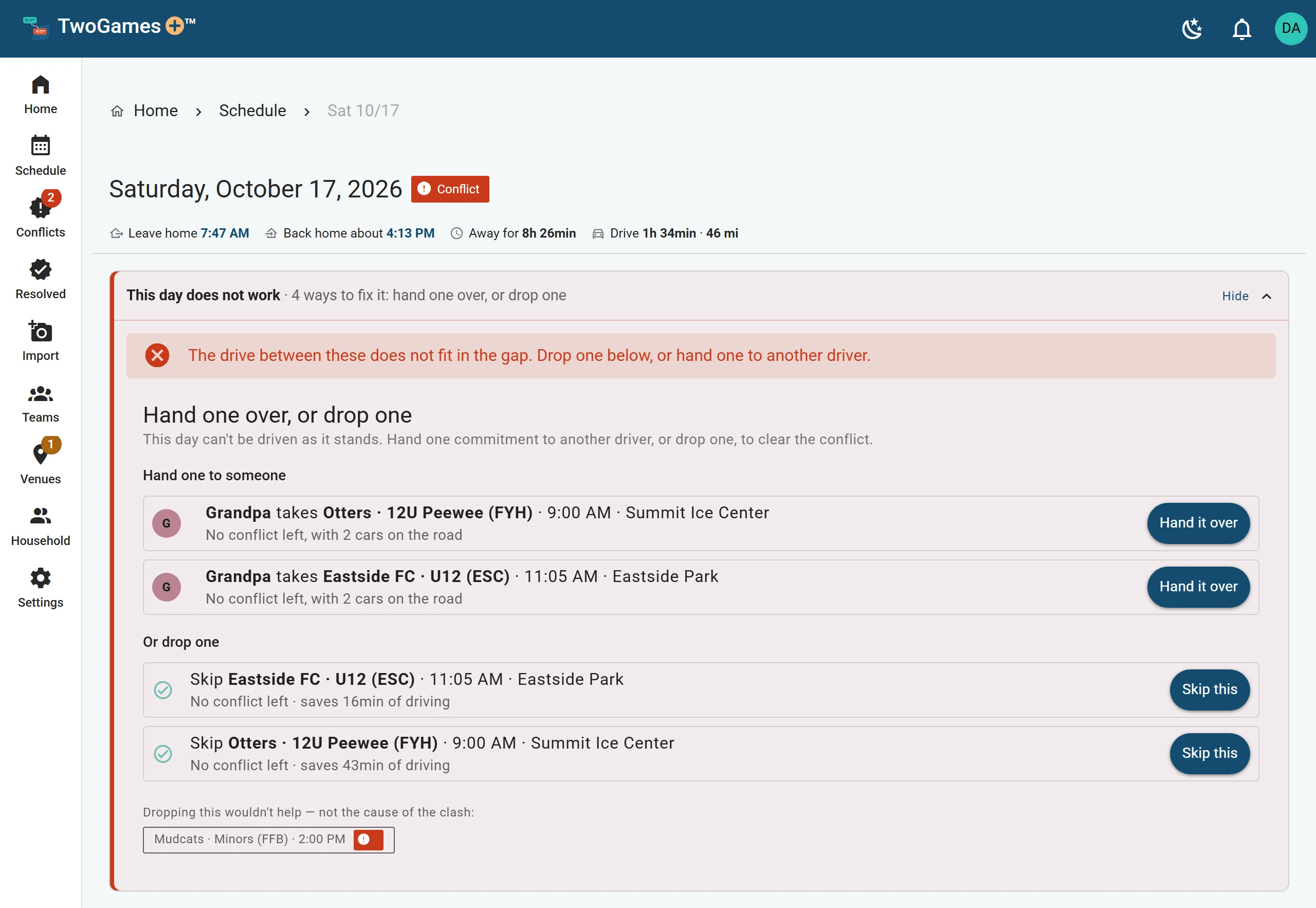
Saturday, October 17, a Conflict, with its fixes open: Grandpa takes Ava’s hockey game or Maya’s soccer game, either leaving no conflict with two cars on the road, or drop one of the two.
4 Fix the day. Fix it lists the ways to make the day work.

What it does

Everything except carrying the bat bag, the bucket of balls and the cooler.

Drive times between venues

Between your own rinks, fields and courts, and from home, for the hour you'll be driving. Where the map has no answer, estimated from the distance.

Live traffic on the day

On a day you drive, check the road before you leave. How many checks each drive gets depends on your plan.

Everyone who drives

Invite the other drivers in your household, like a partner or a grandparent. Everyone sees the same season, and who's driving to what.

Practices and tournaments

Weekly practices, one-day events and whole tournament weekends, beside every imported game.

Import from a screenshot

A picture or PDF of a schedule, read by an AI model, then checked by you, row by row. We don't keep the picture.

Your team's calendar link

If your team's app gives you a calendar link, paste it, and check each event before it's saved. On Starter and Captain, keep the link, and TwoGames+ checks it again and tells you what changed.

Reminders to leave

In our Android app, your phone tells you when it's time to go, even with the app closed. We don't keep them, and nothing about them is sent anywhere.

A timeline that follows you

Turn on location on your phone and today's plan follows along. Nobody else in your household sees where you are, and we don't keep it.

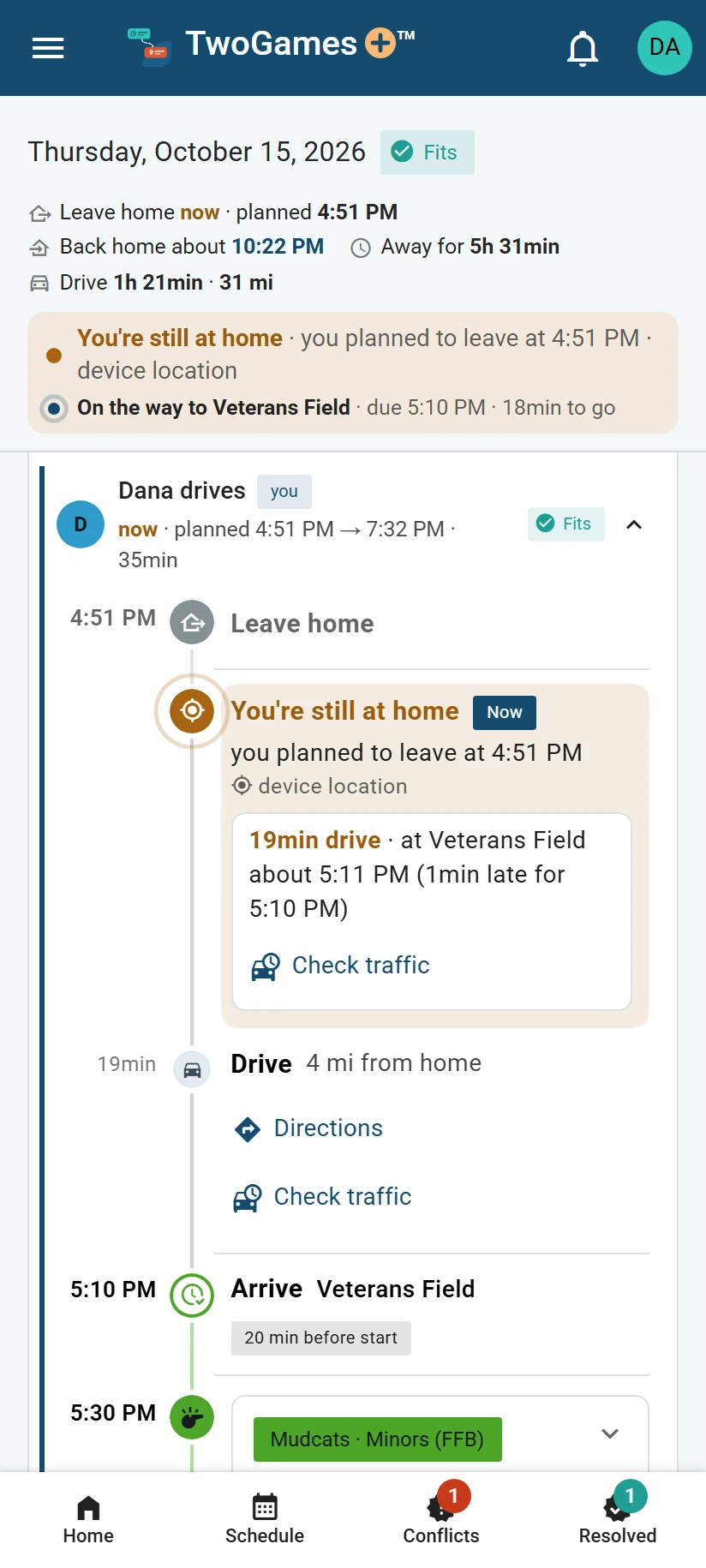
Thursday’s timeline on a phone with location on, a minute after the time to leave: You’re still at home, and Leave home now.
A timeline that follows you. With location on, today follows your phone.

Your data

What we keep, and what we don't.

A schedule says where you, or your kids, will be and when. The privacy notice says exactly what the code does with it, and these are its own words.

Read the privacy notice

This website sets no cookies and loads nothing from anyone else.

  • Ads and trackingWe don't sell it, show ads, use advertising or tracking tools, or use it to train AI models.
  • SharingWe don't sell or rent your data, share it with advertisers, or use it for anything but running TwoGames+.
  • A picture you importA picture of a schedule you import is read once by an AI model running on Microsoft Azure. We don't keep the picture, and it isn't used to train AI models.
  • Your location, if you turn it onNobody else in your household sees where you are, and we don't keep it.
  • Deleting itYour household's Owner can delete it, and everything in it, at any time from the Household page, apart from a short record of each plan bought for it, kept to show what was agreed.

Plans

Start free. Pay only when you need more.

Every plan checks every day. Plans differ in how many players, teams and people, how many schedules we read for you, and how often traffic is checked.

Launch price

$34.99 a year for Starter and $69.99 for Captain, for yearly plans started by November 29, 2026, 11:59 PM Eastern. From November 30, new yearly plans are $49.90 and $99.90: two months free compared with paying monthly. A yearly plan started at the launch price renews at that same price for as long as it stays yearly on the same plan. Monthly prices don't change.

Rookie

Free, with no card needed.

$0

Every day checked, like every plan.

Start free
  • 1 player and 2 teams
  • 2 people who sign in
  • 3 schedule reads to start
  • Live traffic checked at most once for each drive
  • Your timeline follows where your phone is, if you turn it on
Our pick

Starter

More players, teams and schedule reads.

$4.99/ month

Or $34.99 a year through Nov 29.Or $49.90 a year.

Choose Starter
  • 2 players and 4 teams
  • 2 people who sign in
  • 8 schedule reads a month
  • Live traffic checked up to 3 times for each drive
  • Team calendars checked for changes when you open the app
  • Rank 2 teams or leagues, and we suggest which game to skip
  • Your timeline follows where your phone is, if you turn it on

Captain

More of everything, and drive times from where you are.

$9.99/ month

Or $69.99 a year through Nov 29.Or $99.90 a year.

Choose Captain
  • 4 players and 8 teams
  • 4 people who sign in
  • Unlimited schedule reads
  • Live traffic checked on every Refresh, up to every 5 minutes
  • Team calendars checked for changes when you open the app
  • Rank 4 teams or leagues, and we suggest which game to skip
  • Your timeline follows where your phone is, if you turn it on
  • Drive times from where you are

Only for a schedule you added from a team's calendar link, while the link is kept on that team.

Prices in US dollars, before sales tax. Compare plans in full

Videos

Shorter than the seventh-inning stretch.

The TwoGames+ reel, 43 seconds, with sound
Reel 43 seconds, with sound

The whole idea in 43 seconds

Two games, one car, and the check that says whether one driver can make both. It plays from this site's own files, and the video loads only when you press play.

Also on our YouTube channel

Every video

Questions

Asked on the sidelines

Who is it for?

Adults with more than one team to get to, such as parents and guardians driving their kids, adults who play in a league or two, college athletes with a club team on the side, and coaches planning their own driving. Accounts are for adults, 18 or older; children don't sign up.

Is there an app for my phone?

Yes, for Android: get TwoGames+ on Google Play. It can remind you when it's time to leave. On an iPhone or a computer, use TwoGames+ in your web browser.

Can a coach use it?

Yes, to plan your own driving: add the team you coach, with yourself on it, alongside your household's other teams. Add the team's players only if you drive them. It doesn't manage a team, and nobody on the team sees your schedule.

Is it really free to start?

Yes. The Rookie plan costs nothing: 1 player and 2 teams, with every day checked. Paid plans add players, teams, schedule reads and live traffic checks, check team calendars for changes, and rank which games come first. Captain also adds people who sign in, and drive times from where you are. Pricing has the rest.

Which sports does it know?

Hockey, soccer, baseball, basketball, football, flag football and lacrosse, each with its own game and practice lengths and how early to arrive. Anything else goes under Other, with numbers you set.

Does TwoGames+ tell me how to drive?

No. It plans the day with estimated drive times. You do the driving, at whatever speed the road, the weather and the law allow, and never with the app in your hand. If a day is Tight, the fix is a different plan, not a faster drive. The terms say more.

What happens to the screenshot I upload?

An AI model reads it once. We don't keep the picture. We keep the rows you save, and a note that we read it. The privacy notice says who reads it, and where.

Can someone else see the same schedule?

Yes. Your household's Owner invites them by email, as an Editor who can change the schedule or a Viewer who sees it. How many people can sign in depends on the plan.

Know on Monday which Thursday goes to penalties.

Start free